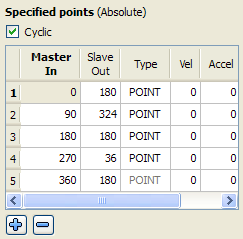
These points could be different from those in the figure above, depending on the offsets and amplitudes specified in the cam profile (see "Create Cam Profiles") dialog box.
Table 10-1: Cam Editor - Table Parameters
About Cyclic Cam Element
 If the Cyclic check box is selected, the cam profile is executed cyclically. This means that, when the axis attached to this cam runs continuously, the same profile is executed again. In this case, the first and last element must have the same Vel and Accel values. Therefore, changing the Vel or Accel value of the first or last elements automatically changes the other elements' value.
When Cyclic is first turned on, the Vel/Accel values will automatically be copied from the first element to the last element when they do not match. A warning dialog is displayed to inform you that this change has happened. This alert can be suppressed until KAS is closed.
There are some combinations of points and lines where Cyclic will automatically be turned off. If this occurs, the cyclic checkbox label will be changed to Cyclic (automatically turned off). The following changes to the profile will automatically turn off cyclic:
|
Stay Connected with Kollmorgen       
|
Copyright © 2015 Kollmorgen™ |

|